

A brag document is a running list of your work accomplishments, with the impact and proof for each one, that you keep all year and share with your manager before reviews. To build one, create six sections (goals, projects, collaboration, feedback, learning, and impact), fill them from your email, calendar, and project tools, then update it every two weeks.
A brag document template is the fastest fix for a problem almost everyone has at review time: you sit down to describe your year and can only remember the last two months. The name puts some people off. It shouldn't. A brag doc isn't about exaggerating. As the engineer who popularized it puts it, the goal is to make your work sound exactly as good as it is.
Below you'll find a fully filled-in brag document example, a 30-minute guide to building yours, and a blank template to copy.
What is a brag document?
A brag document (also called a brag doc, hype document, or accomplishments log) is a private, running record of what you've done at work and what it led to. You add to it as you go, then use it to prepare for reviews, promotion conversations, and job searches.
The idea was popularized by software engineer Julia Evans in her 2019 post, Get your work recognized: write a brag document. Her point was simple. If you can't remember everything you did, your manager can't either, and they need specifics to advocate for you.
A brag doc is different from a resume (which is short and polished) and from a self evaluation (which answers your company's questions). It's the raw material for both.
Why keep a brag doc: make your contributions easier to recall and explain.
Evans started brag documents with a colleague to help women in engineering advocate for themselves, because some people undersell their accomplishments more than they should. Research backs up how common that is.
In a series of experiments by economists Christine Exley and Judd Kessler, published in the Quarterly Journal of Economics, people took the same test and then rated how well they did. Men and women scored the same on average, yet women rated their own performance far lower. The gap held even when people knew their exact scores, according to the NBER working paper behind the study.
Exley and Kessler, The Gender Gap in Self-Promotion, NBER Working Paper 26345 (2019), published in the Quarterly Journal of Economics (2022) · online experiment participants

Anyone can undersell their work, for many reasons: modesty, a fuzzy memory, or work that's hard to see. A brag document puts the facts on paper before the review starts, so the conversation begins from what you did, not from how comfortable you feel describing it.
Brag document example: a filled-in sample
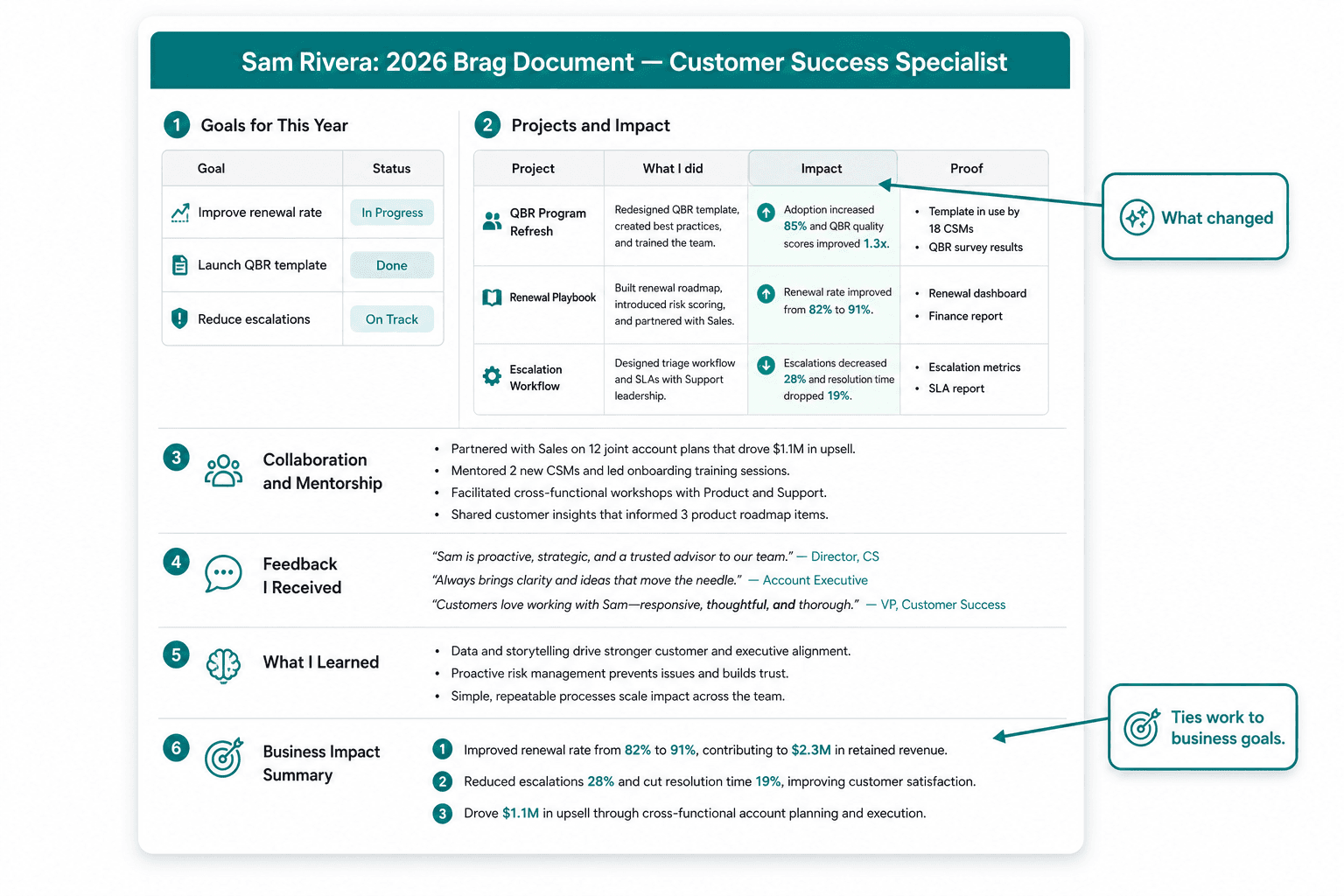
Most brag document examples online come from software engineers, because that's where the idea started. This one is for a customer success specialist, to show the format works for any role. The person and numbers are invented. Copy the structure, not the content.
Sam Rivera: 2026 brag document Customer Success Specialist, Mid-Market team. Last updated October 30.
1. Goals for this year
| Goal | Status | Notes |
|---|---|---|
| Keep renewal rate on my accounts above 90% | Done | 94% through Q3 |
| Cut average time to first value for new clients | Done | 21 days down to 13 |
| Lead one cross-team project | In progress | Billing FAQ project, launching November |
2. Projects and impact
| Project | What I did | Impact | Proof |
|---|---|---|---|
| New client onboarding checklist | Wrote the checklist, trained the team on it | Time to first value fell from 21 days to 13 | Onboarding dashboard, March vs August |
| Saving the Harlow account | Ran weekly calls and a recovery plan after a service outage | Client renewed for two years instead of leaving | Renewal contract, client email of June 12 |
| Billing FAQ (in progress) | Collected the top 20 billing questions, drafted answers with finance | Expected to reduce billing tickets | Draft in shared drive; launch set for November |
3. Collaboration and mentorship
- Trained two new hires on our support tools. Both handled accounts on their own by week three.
- Covered a teammate's eight accounts during her six-week leave. No escalations.
- Ran a monthly sync with finance that ended last-minute billing surprises for our team.
4. Feedback I received
- "Sam turned a client who was ready to leave into our strongest reference." Head of Customer Success, July
- "The onboarding checklist is the first thing I send to new clients now." Teammate, in team chat, April
Save feedback like this the day you get it. The most useful notes name a specific moment and its effect, much like these SBI feedback examples.
5. What I learned
- How to run a recovery plan for an unhappy client
- Reading our renewal-risk dashboard and acting on early warning signs
- Writing training material other people actually use
6. Business impact summary
Three things I want my manager to remember:
- Retention: 94% renewal rate on my accounts, including saving a two-year contract.
- Speed to value: new clients get results eight days sooner, which supports the company goal of growing expansion revenue.
- Team capacity: two new hires trained, and eight accounts covered during a leave, with no drop in service.
That last section is what turns a list into an argument. Each point ties a piece of work to something the business cares about.
How to build your brag document in 30 minutes
You don't need a weekend. Set a timer and work through these five blocks. The first version will be rough, and that's fine. A rough brag doc you update beats a perfect one you never start.
Minutes 0 to 5: set up the doc
Copy the blank template at the end of this post into a new document. Name it with the year, like "Brag document 2026", and start a fresh one each year. Keep it in one of the workplace tools you already open every day, such as your notes app or a cloud doc, so adding to it takes seconds.
Keep it private by default. You'll decide what to share later.
Minutes 5 to 15: mine your records
Don't rely on memory. Spend ten minutes scanning where your work leaves a trail, and dump everything into a rough list:
- Sent email and chat: launches, "thank you" replies, and anything you announced
- Calendar: presentations, workshops, client meetings, and big deadlines
- Project tracker or ticket history: what you closed or shipped
- Dashboards and reports: any number you moved
- Praise: search your messages for "thanks", "great", and "nice work"
No polishing yet. Small things count too: training a new hire or fixing a recurring problem often matters more than it felt at the time.
Minutes 15 to 22: add impact and proof to your top five
Pick the five items that mattered most. For each one, add what changed because of it and where someone could check. Evans' tip is to watch for entries that stop too early: "I shipped X" needs "which caused Y" after it.
| Before | After |
|---|---|
| "Wrote onboarding checklist." | "Wrote the onboarding checklist; time to first value fell from 21 days to 13 (onboarding dashboard)." |
| "Helped with the Harlow account." | "Ran a recovery plan after the outage; Harlow renewed for two years (renewal contract)." |
Minutes 22 to 27: tie your work to business goals
This is the step most people skip, and it's what makes a brag doc persuasive. For each top item, ask which of these it helped:
| Business outcome | Question to ask yourself |
|---|---|
| Revenue | Did it help win, keep, or grow a customer? |
| Cost | Did it save money, tools, or hours? |
| Speed | Did something happen faster? |
| Quality or risk | Did it prevent errors, complaints, or problems? |
| People | Did it help others do their jobs or grow? |
Writing one line that connects your work to value creation for the business is a skill in itself. There's a course on it at the end of this post.
Minutes 27 to 30: set a reminder and plan to share it
Put a 15-minute recurring event on your calendar, every two weeks, called "Update brag doc." Then note when you'll share it: a week before your review, or before any promotion conversation. Sending it early is a good example of proactive communication, and it gives your manager time to use it.
How to keep your brag doc up to date
Evans notes that many people update their brag doc every two weeks, while she prefers one longer session every six months. Try both and keep whichever you'll actually do. Either way, a few habits help:
- Add praise the day you get it. Copy the message and the date. It's much harder to find later.
- Go back for results. Many projects show their impact months after launch. Fill it in when it arrives.
- Bring it to your one-on-ones. Mention one entry each month, so your manager hears about your work as it happens, not only at review time. Your manager may already be asking questions like these [[one-on-one meeting questions for managers]](https://coach.jove.com/blog/one-on-one-meeting-questions-managers).
- Use it to set goals. Reading your doc each quarter shows what you enjoy and what you'd like more of, which is a solid starting point for [[career goal setting]](https://coach.jove.com/individual-contributor-excellence/personal-development).
- Use it for promotion cases. Your brag doc is the evidence that you're already working at the next level, which is half the answer to [[how do you get promoted]](https://coach.jove.com/individual-contributor-excellence/how-to-get-promoted).
Sharing it helps your manager too. Managers are taught to recognize specific work, as in recognizing contributions so they register, and your brag doc hands them the specifics. If writing about your own wins feels uncomfortable, you're not alone. Even new managers deal with imposter syndrome, and a factual record can help you describe your contributions more clearly.
Blank brag document template (copy and paste)
Copy this into any doc or notes app. Delete the hints in brackets as you fill it in.
[YOUR NAME]: [YEAR] BRAG DOCUMENT
[Role, team]. Last updated: [date]
1. GOALS FOR THIS YEAR
- [Goal] | Status: [done / in progress / dropped] | Notes: [result so far]
2. PROJECTS AND IMPACT
- Project: [name]
What I did: [your specific contribution]
Impact: [what changed, with a number if possible]
Proof: [dashboard, email, launch date, person who can confirm]
3. COLLABORATION AND MENTORSHIP
- [Who you helped, trained, covered for, or unblocked, and what happened]
4. FEEDBACK I RECEIVED
- "[Exact words]" [who, when, where]
5. WHAT I LEARNED
- [Skill, tool, or lesson, and where you used it]
6. BUSINESS IMPACT SUMMARY (update before each review)
1. [Top win, tied to revenue, cost, speed, quality, or people]
2. [Second win]
3. [Third win]
GOALS FOR NEXT YEAR
- [Goal] | Skill to build: [skill] | Support I'd ask for: [support]
Brag document mistakes to avoid
| Mistake | Why it hurts | Do this instead |
|---|---|---|
| Listing tasks, not results | "Ran weekly calls" says nothing about what changed | Add the result and the proof to every entry |
| Waiting until review day without keeping supporting records. | You'll remember the last two months best | Spend 15 minutes every two weeks |
| Leaving out "fuzzy" work | Mentoring, process fixes, and covering for others are easy to forget and easy to undervalue | Give them their own section, with any effect you saw |
| Inflating claims | One stretched number can undermine the whole doc | Make your work sound exactly as good as it is |
| Keeping it to yourself | Your manager can't use what they never see | Share the summary before reviews and promotion talks |
Turn your wins into business results
The strongest brag documents connect each piece of work to what the business needs: revenue, cost, speed, quality, or people. That connection is a learnable skill. The course on business acumen shows how your company makes money and how your work fits in, so you can describe your impact in the terms your manager and their manager care about.

Related course - Understanding the Business Context
Short lessons on how your company makes money and how your work fits in, so you can describe your impact in the terms your manager cares about.
Common Questions
What should be in a brag document?
Include your goals and their status, projects with your contribution, impact, and proof, collaboration and mentoring, feedback you received in the person's own words, what you learned, and a short summary of your top three business results. Add to it as you go, not only at review time.
How often should you update a brag document?
Many people update it every two weeks, in a 15-minute session. Some prefer one longer session every six months. Whatever the rhythm, add praise and big results the day they happen, because they're hard to find later.
Should you share your brag document with your manager?
Yes, at least the summary, about a week before your review or any promotion conversation. It gives your manager specific examples to use when they write your review or advocate for you. Keep personal notes or anything sensitive out of the version you share.
What is the difference between a brag document and a resume?
A resume is a short, polished summary for people outside your company. A brag document is a longer, private working record with details, numbers, and proof. You use the brag document to write your resume, your self evaluation, and your promotion case.


