Quick answer: Handle holiday time off requests with rules your team knows in advance: set minimum coverage first, publish a request deadline, approve in order received, rotate the most popular days each year, and say no early with an alternative. A simple coverage grid shows at a glance which days are safe to approve.
Holiday time off requests can create frustration on a team when the approval rules are unclear or applied inconsistently. The fights are rarely about the days themselves. They're about rules nobody wrote down, so every decision looks like favoritism.
The fix is to decide how you'll decide before the requests arrive. Here are six rules, a coverage grid you can copy, and what to say when the answer is no.
How to handle holiday time off requests: 6 fair approval rules
1. Set minimum coverage before you look at a single request
Decide how many people you need working each day for the work to get done safely. Write it as a number per day, such as "at least 2 of 6 on the support schedule." Quiet days may need fewer, and days with known deadlines need more.
That number turns every request into a simple check: does approving this keep us at or above minimum? Knowing your real capacity is the core of how to balance workload and team capacity, and it's what makes a "no" defensible.
2. Publish the rules and a deadline
Share your rules in writing, with a date. For example: "Send December requests by November 1. I'll confirm all of them by November 8." A deadline gives everyone the same chance, and it stops the person who asks first in August from claiming the whole month.
Written rules are part of setting clear expectations. Unwritten ones get filled in by guesswork.
3. Approve in the order received, within the limit
After the deadline, approve requests in the order they came in until a day hits its coverage limit. First-come is simple and easy to explain. On its own it favors the people who plan earliest, which is why rule 4 exists.
4. Rotate the peak days year to year
Keep a short record of who had the most-wanted days last year, such as the week of December 24. Whoever had them last year goes to the back of the line for those days this year. Without a rotation, the same people win every year, and the rest of the team notices.
5. Route special cases through HR
Some requests aren't a matter of preference. In the US, requests tied to religious observance can carry legal accommodation duties, and leave for medical or family reasons follows its own rules. Don't run these through first-come. Talk to HR before you decide.
6. Decide early, and say no with an alternative
Give answers by your promised date, not the week before. People book travel. A late no costs them money and costs you trust. When you have to decline, offer the nearest day you can approve, or first pick next year.
Fairness here is mostly about visibility. If everyone can see the rules and the grid, decisions stop feeling personal, and you avoid one of the common first-time manager mistakes: trying to keep everyone happy by saying yes to everything until the schedule breaks.
Holiday coverage grid template
A coverage grid puts every request on one page, so you can see in seconds which days are safe to approve and which are full. Here's a filled-in example for a team of six that needs at least three people working each day:
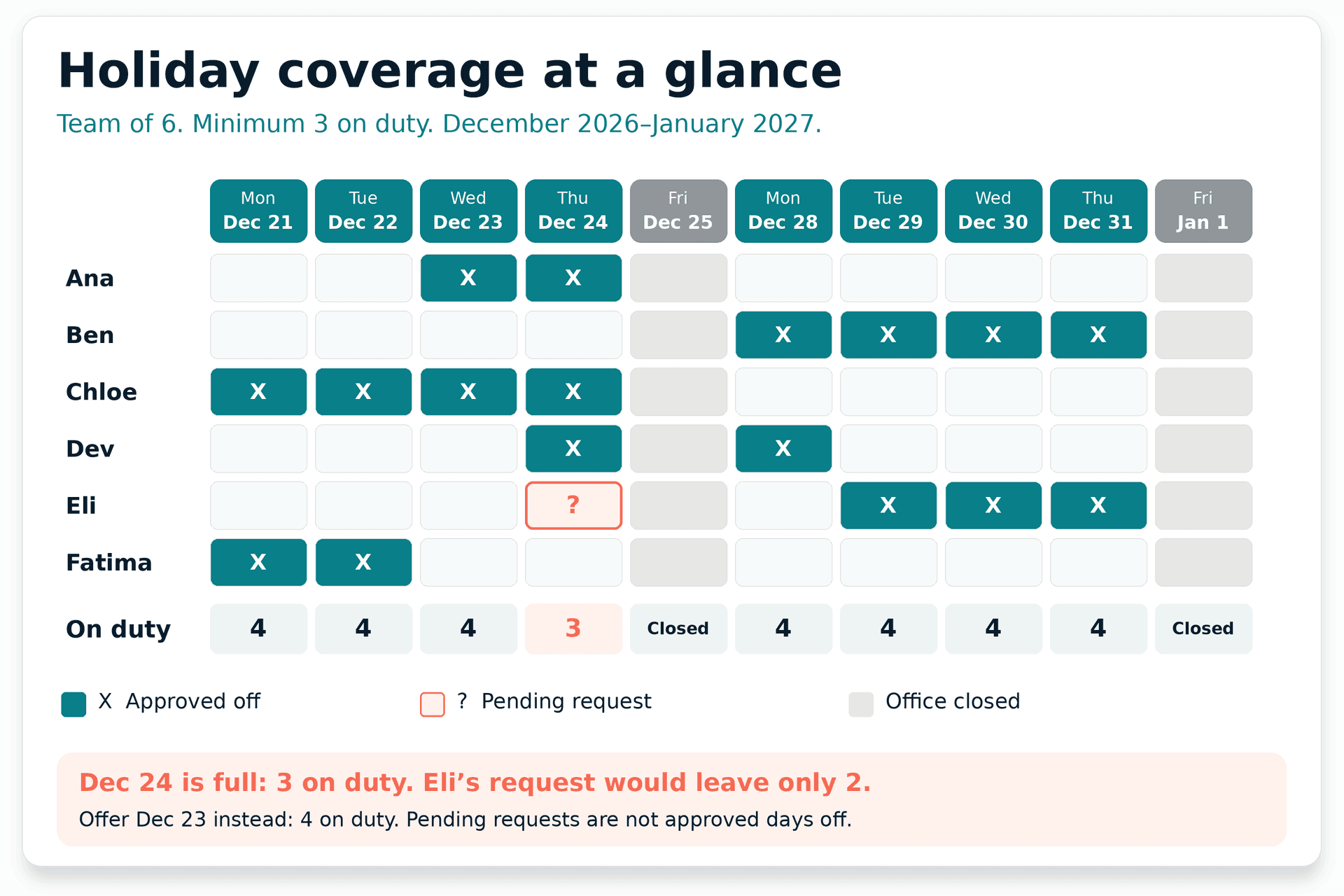
Example coverage grid for the last two weeks of December 2026. Names and requests are invented. Look at Thursday, December 24. Three people are already off, so only three are working, which is exactly the minimum. Eli's pending request for that day would drop coverage to two. Under rule 3, the earlier requests stand, so Eli gets a no for the 24th and an offer of the 23rd instead, where four people are working.
Without the grid, that decision feels like a judgment about Eli. With it, the reason is visible to everyone.
Copy this blank coverage grid
Paste it into a spreadsheet and replace the dates and names. Mark approved days off with "X" and pending requests with "?".
| Name | Mon | Tue | Wed | Thu | Fri | Mon | Tue | Wed | Thu | Fri |
|---|---|---|---|---|---|---|---|---|---|---|
| [Name 1] | ||||||||||
| [Name 2] | ||||||||||
| [Name 3] | ||||||||||
| [Name 4] | ||||||||||
| On duty | ||||||||||
| Minimum |
Three tips for using it:
- Fill in closed days first, so nobody wastes a request on a day the office is shut.
- Share it read-only with the team. People can check before they ask, which cuts requests for full days.
- Add on-call or backup names for days at the minimum, so one sick call doesn't leave you short.
Thinking ahead about what could go wrong is the point of assessing operational risks.
How to say no to a holiday time-off request
Say it in person or on a call, not in a one-line rejection in the scheduling tool. Point to the rule, not the person, and offer something:
I can't approve the 24th. Three people are already off that day, and we need three working to cover support. I can approve the 23rd, and you'll get first pick of the holiday week next year. Does either of those help?
If someone is upset, listen before you defend the rule. Sometimes there's a reason you didn't know about, like a family event that only happens once. That's when a swap with a willing teammate can fix things without breaking the rules for everyone else. Ask, but don't pressure anyone to give up their day.
Watch for a pattern, too. If a strong performer keeps losing out on time off, flexibility can quietly become a reason to leave, as this guide to what to do when your best employee wants to quit explains.
What to put in your holiday PTO policy
In the US, federal wage law doesn't require paid holidays or vacation. The Department of Labor's guidance on holidays says these are a matter of agreement between employer and employee. So your company's policy sets the rules, and some states and contracts add their own. Check with HR before promising anything about pay.
If your company has a holiday PTO policy, follow it and point your team to it. If you're setting team-level rules within it, cover these points in writing:
- Which days the office is closed and which are normal working days
- The request deadline and the date you'll confirm decisions
- Minimum coverage for each day or role
- How ties are decided: order received, plus the yearly rotation for peak days
- How special cases work, such as religious observances or emergencies, with HR involved
- Swaps: whether teammates can trade days, and who needs to approve
- Holiday pay or comp time for anyone who works a holiday, as set by company policy
Share it in your next team meeting, and leave five minutes for questions. Explaining the reasoning once saves you a dozen one-on-one debates in December.
Run the team smoothly through every busy season
Holiday requests are one version of a challenge that comes up all year: matching the work to the people available. The course on task prioritization covers planning, balancing workload, and spotting bottlenecks before they hit, in videos under two minutes each. It's one of 13 short courses in New Manager Essentials.

Related course - Managing Team Operations and Priorities
Short lessons on planning, balancing workload, and spotting bottlenecks before they hit, so holiday week is one busy season you already know how to run.
Common Questions
How do you handle holiday time off requests fairly?
Set a minimum number of people needed each day, publish a request deadline, and approve requests in the order received until a day reaches its limit. Rotate the most popular days each year, so the same people don't always get them. Share the rules and a coverage grid with the team, so every decision is visible.
Can a manager deny a holiday time off request?
In most US workplaces, yes, if the decision follows company policy and is applied consistently. Requests tied to religious observance, medical needs, or family leave may have legal protections, so involve HR before denying those. Always explain the reason and offer an alternative where you can.
What is first-come, first-served for holiday PTO?
It means requests are approved in the order they're received until a day reaches its coverage limit. It's simple and easy to explain, but on its own it favors people who plan earliest, so many managers pair it with a request deadline and a yearly rotation for peak days.