Loading…
Loading video…

15,885 views
Did you know that Netflix uses regression analysis to predict which shows you'll binge-watch next? Microsoft Excel regression analysis is a powerful statistical tool that helps identify relationships between variables and make data-driven predictions. Students at MIT's Sloan School of Management routinely use Excel's LINEST and FORECAST.LINEAR functions to analyze everything from stock prices to consumer behavior patterns. What is Microsoft Excel Regression Analysis becomes clearer when you see how easily it transforms raw data into actionable insights. Watch the full video on JoVE Coach to master this concept with expert-led visuals and step-by-step explanations.
What is Microsoft Excel Regression Analysis? At its core, it's a statistical method that examines the relationship between one dependent variable and one or more independent variables. Excel provides several built-in functions that make regression analysis accessible to students and professionals without requiring specialized statistical software. This approach is particularly valuable for high school AP Statistics students and college undergraduates studying business analytics or data science.
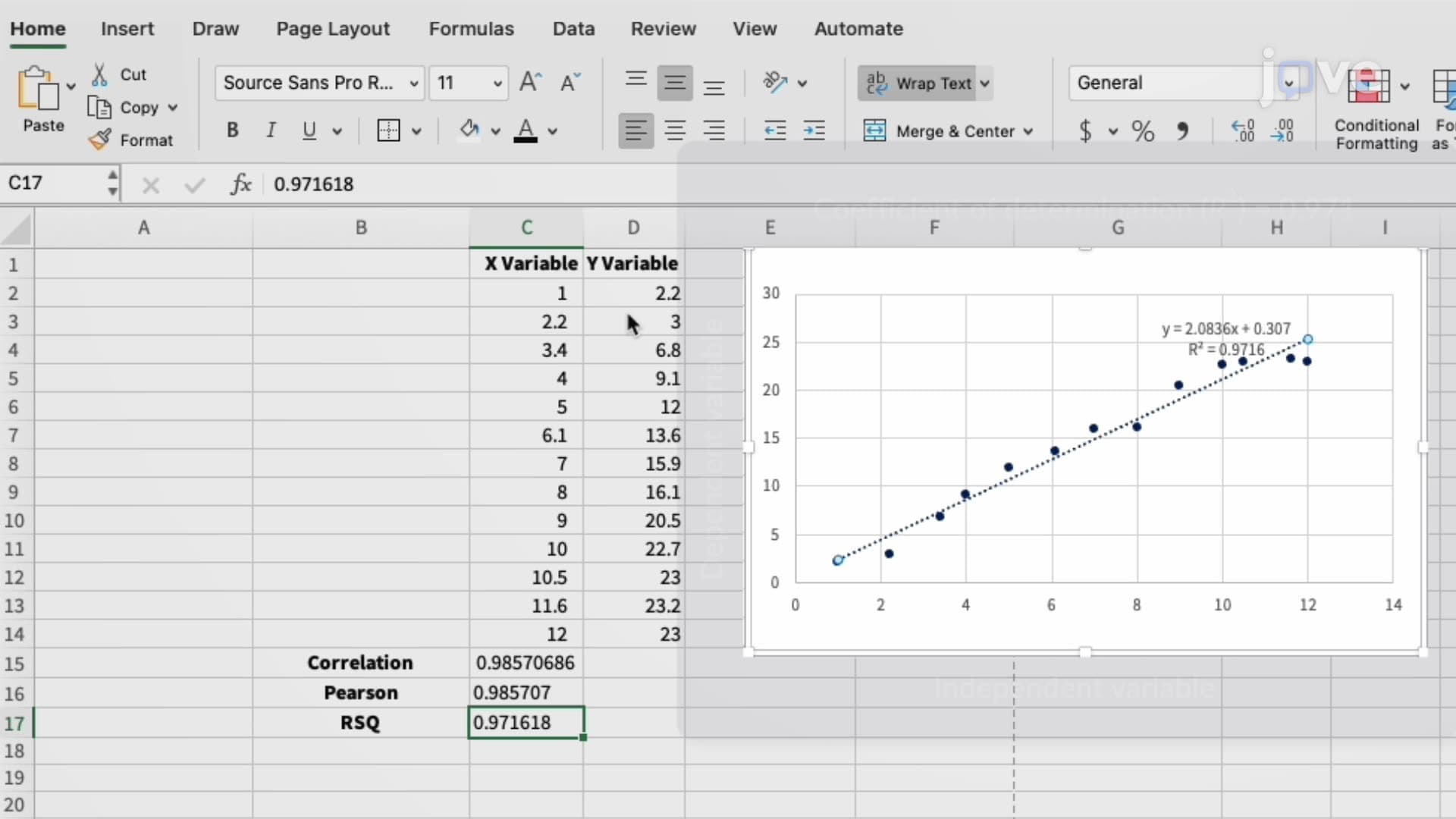
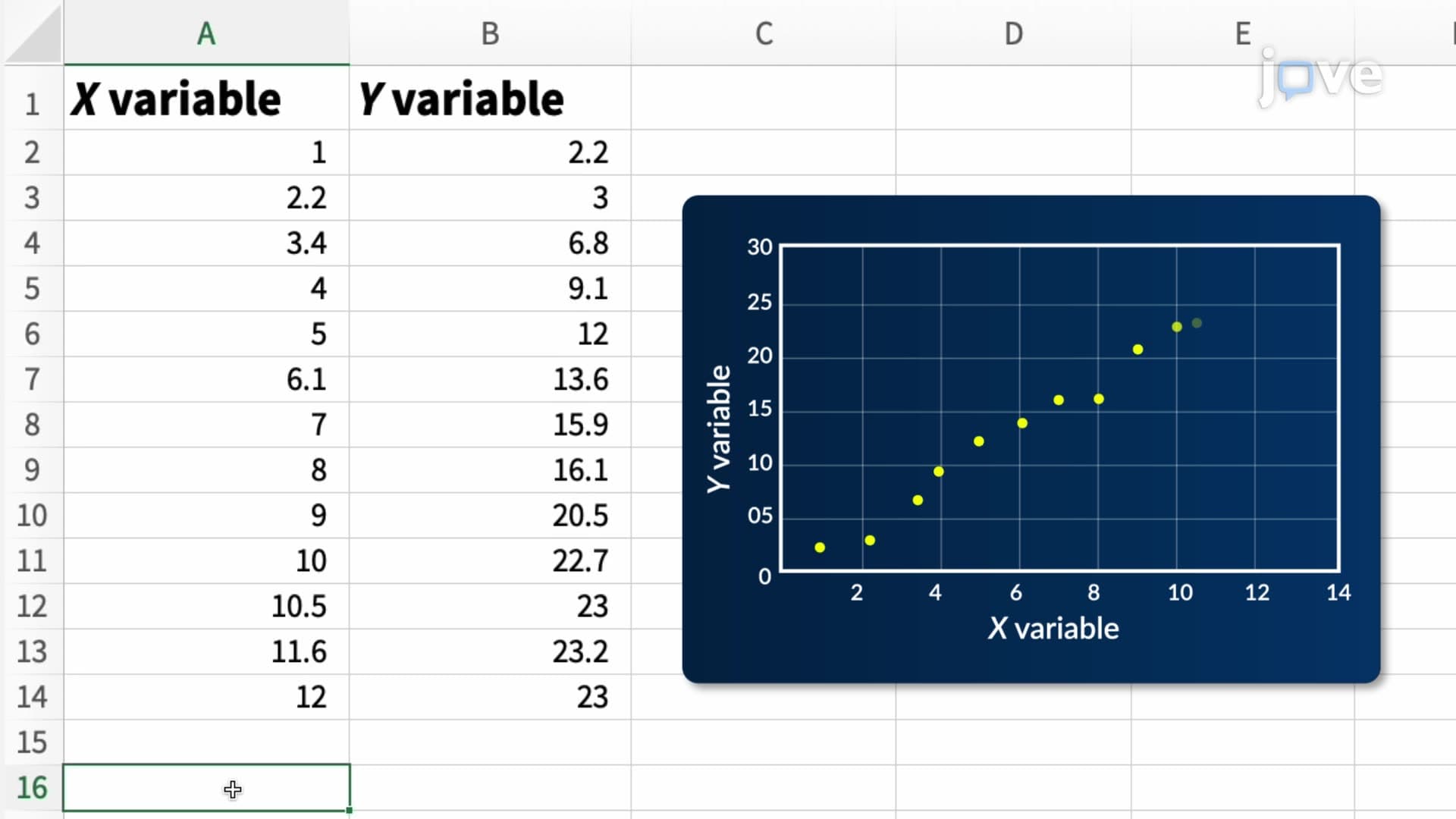
The foundation of Excel regression analysis lies in identifying patterns within data sets. When variables show a linear relationship, we can create mathematical models that predict future outcomes. For example, a retail company might analyze how advertising spend (independent variable) affects monthly sales (dependent variable). Excel's regression tools help quantify this relationship and provide predictive capabilities.
The LINEST function serves as Excel's primary tool for linear regression calculations. This function returns critical statistics including the slope and y-intercept of the best-fit line through your data points. Understanding these values is crucial for AP Statistics students, as they frequently appear on College Board exams. The slope indicates how much the dependent variable changes for each unit increase in the independent variable, while the y-intercept shows the predicted value when the independent variable equals zero.
FORECAST.LINEAR offers another approach, specifically designed for prediction tasks. This function excels when you need to estimate future values based on existing trends. Business students at universities like Wharton and Kelley School of Business regularly use this function for market analysis projects. The syntax requires specifying the target X-value and the known X and Y arrays, making it straightforward for predictive modeling.
Excel regression analysis appears extensively in standardized testing environments. SAT Subject Tests in Mathematics Level 2 often include regression problems, while AP Statistics students must demonstrate proficiency with correlation and regression concepts. College-level courses in economics, psychology, and business rely heavily on these analytical skills.
Professional applications span numerous industries. Healthcare organizations use regression analysis to predict patient outcomes and resource allocation needs. The pharmaceutical industry employs these techniques during clinical trials to analyze drug effectiveness. Financial institutions apply regression models for risk assessment and investment portfolio optimization. These real-world applications make Excel regression analysis an essential skill for students entering STEM and business careers.
Successful regression analysis requires understanding underlying assumptions. Linear relationships work best when data points cluster around a straight line, residuals show random distribution, and outliers don't unduly influence results. Students preparing for advanced placement exams should recognize when these conditions aren't met and understand alternative approaches.
Excel's regression capabilities extend beyond simple linear models. Multiple regression analysis allows examination of several independent variables simultaneously, while polynomial regression addresses curved relationships. These advanced techniques prepare students for graduate-level coursework and professional data analysis roles.
Frequently Asked Questions
Microsoft Excel regression analysis is a statistical technique that examines relationships between variables and creates predictive models using Excel's built-in functions. Unlike descriptive statistics that simply summarize data, regression analysis identifies cause-and-effect relationships and enables forecasting. It's more accessible than specialized software like SPSS or R, making it ideal for students and business professionals who need quick, reliable analytical results.
AP Statistics exams frequently include regression problems focusing on interpretation of correlation coefficients, residual analysis, and prediction accuracy. College statistics courses test students on function syntax, assumption validation, and real-world application scenarios. Expect questions about choosing appropriate regression models and explaining limitations of linear relationships in various contexts.
Focus on mastering LINEST for calculating slope and y-intercept, FORECAST.LINEAR for making predictions, and TREND for identifying patterns in time series data. College professors often test students on proper array selection and interpretation of function outputs. Practice calculating correlation coefficients using CORREL and understanding when regression analysis is appropriate versus other statistical methods.
Absolutely! Excel regression analysis requires only basic algebra skills and understanding of coordinate systems. The software handles complex calculations automatically, allowing students to focus on interpretation and application. Most high school students can master these concepts with practice, especially when they see real-world examples like predicting GPA based on study hours or analyzing sports performance trends.
Companies like Amazon use regression analysis to optimize pricing strategies and predict customer demand patterns. Tesla analyzes production efficiency trends using Excel models before implementing expensive manufacturing changes. McDonald's applies these techniques to forecast sales at new restaurant locations based on demographic data. Healthcare systems use regression to predict patient volume and staffing requirements during different seasons.
Create practice datasets using familiar scenarios like grade prediction or sports statistics, then work through each Excel function systematically. Focus on interpreting outputs rather than memorizing formulas – understanding what slope and correlation values mean is more important than perfect syntax recall. Form study groups to discuss real-world applications and quiz each other on assumption validation and limitation identification.
Progress to multiple regression analysis using Excel's Data Analysis ToolPak, which handles several independent variables simultaneously. Explore polynomial regression for curved relationships and logistic regression for binary outcomes. Students planning careers in data science should also learn about residual analysis, confidence intervals, and statistical significance testing to prepare for graduate-level coursework.
Related Micro-courses



Related Subjects
 Physics 33 micro-courses›
 Math Fundamentals 11 micro-courses›